IE Logout for Lightning!

If you’ve read my blog posts on Lightning, you may recall this post about how we initially addressed users who try logging in with Internet Explorer 11. It wasn’t the most elegant solution.

Enter the awesome, fantabulous, Lightning Champion, Melanie Zilles Head! If you haven’t met Melanie yet, you should make it a priority to do so (her contact info is at the bottom of this post)! I’ve known Melanie for almost 4 years now and am lucky to call her friend. She is the Ft. Worth User Group leader and a powerhouse in the Lightning adoption community! After talking with her about out challenges with IE, and during her Lightning implementation she came up with the perfect way to prevent users from logging in using IE while providing them with customizable guidance on what browsers they should be using!

Without further ado, check out this awesome solution:

You rolled out Lightning, you are checking your adoption metrics in the Lightning Usage App, and you are realizing how many users are currently using IE11 (or versions older than that). Understandably, you are not a huge fan. There are 2 significant issues:

  1. IE11 is not here to stay. Even if you opt-ed in for the extended support, Internet Explorer support for Lightning is going scheduled to go away (see Help Documentation). But that doesn’t mean that you are “OK” for now – because IE11 is still known to have significant performance issues (Knowledge Article). You worked hard on your Lightning rollout – don’t let IE ruin it for your users
  2. IE11 is known to not meet certain performance and security standards (Knowledge Article). That’s a risk you shouldn’t take.

Nana previously shared great ideas on how to “encourage” users to stay away from IE11 (and therefore the Classic UI), but taking away some of the functions they so desperately need. Unfortunately, there a certainly loopholes (ie links/ Ids that can be posted into the URL) that would still allow users to access what they need.

So, if you find yourself needing a more ‘radical’ approach, read on! You will learn how to use a login flow to prevent users from logging in when they use IE.

What are login flows?

Login flows are basically Visual Flows that allow you to either show custom messages to your user, and for our use case, make an assignment that sets the LoginFlow_ForceLogout(type boolean) output attribute to ‘true’, which will prevent the user from logging in.

If you had a chance to take a sneak peak into a Spring ‘19 pre-release org, you may have seen the brand new and shiny Lightning Flow Builder… If not, here’s your first look into the new design and configuration. #SafeHarbor #ForwardLookingStatement

Task to accomplish:

Do not allow user to log in if IE11 (or any IE version) is used to login.

Solution: Use a Login Flow that does the following:

  1. Lookup the Login History to determine the browser and login type used in the most recent (aka current login attempt)
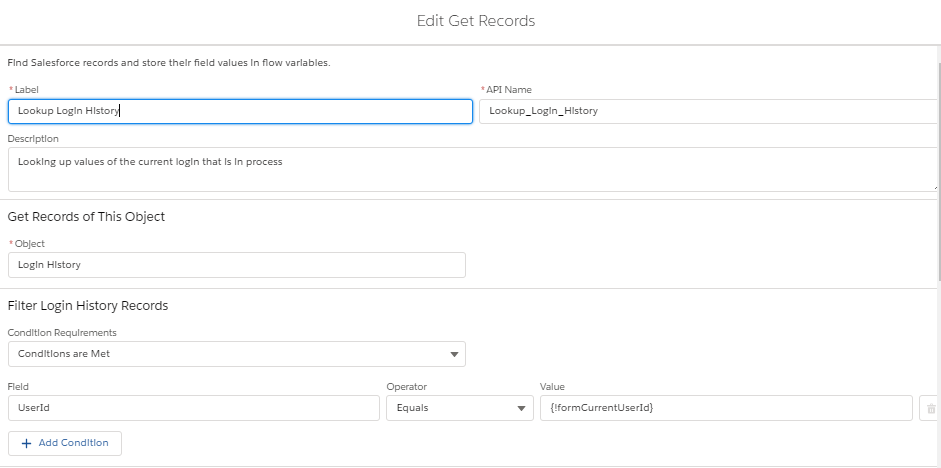
  1. Use a formula Resource to use the User Id of the user that is trying to login
  • Based on the Login Type value, we are checking for non-Browser (non-Standard UI) activity.

**********************************************************

The list of login type values you may want to include here may vary based on your overall setup,

integrations, etc. It’s recommended you check your login history records

(https://workbench.developerforce.com is a great way to do so) for values that you may be expecting based on your users’ login history and make adjustments to this portion of the flow accordingly.

**********************************************************

  • We exit the flow if it is not a true Browser Login attempt (nothing happens, and the user can authenticate successfully).
  • If the user in fact uses a browser, we will check the it’s an IE browser.
  • If the browser is Not IE, we again exit the flow (do nothing) and the user will get logged in successfully.
  • If the browser is IE (IE11, or an older version), we are first showing a quick warning by adding a screen element.
  • Next, the LoginFlow_ForceLogout output attribute is set to “true” using an assignment.
  • So, in the end, the flow will look like this:
  • Lastly you need to create the login flow to actually launch the flow above during a user’s login attempt. For more details, check out the Custom Login Flows help documentation.
    • Be sure to not render this login flow in Lightning Experience. If you do, you may get an error message.

A few more comments:

  1. As a best practice, you may want to consider NOT assigning a login flow to your system admin profile – don’t lock yourself out! (Create a test user instead and always test this in a sandbox first!)
  2. You can expand on this flow to show custom messages or images, etc. If you to, consider using custom settings or custom metadata types to make your flow more dynamic (without actually having to edit the flow itself)
  3. ForceLogout redirect behavior: Know issue in redirect inconsistency: Sometimes user may get redirected to www.salesforce.com instead of the login screen
  4. In the past I have experienced that a Lightning for Outlook authentication shows up as a ‘true’ IE authentication (hopefully that won’t be an issue going forward). However, if you run into this issue, you may want to add a “IE bypass” option that can be temporarily enabled for a user to allow the authentication and then be disabled again to ensure the user continues to be prevented from using IE.
  5. If you can’t wait until the new Flow Builder is available with the Spring 19 release, you can configure the same thing in the current Cloud Flow Designer – you just want get the pretty LIGHTNING view or simplified UI. #LightningNow #LightningChampion #LightningStrikesFlows

Time to celebrate your users being in Lightning at all times!

Feel free to reach out at any time if you have any questions!

Melanie can be found on twitter: @melsfdc
Linked in: Melanie Head
or via the Trailblazer community: Melanie Head


Posted in Salesforce Stuff | Tagged , , , , , , , | 4 Comments

Might Not Seem Like It Some Days, But You Got This.

Despite what your Facebook and Instagram feed displays, there is not one person around you who isn’t going through some shit.

Some people just choose to cover it up, gloss it over, or ignore it. They carefully cultivate a different visual for the world to see.

And that’s ok. It’s what works for them. Maybe it’s what works for you.

And when I talk about ‘going through some shit’, I am not just talking about big stuff. There is a wide variety of crap, big or small, that you could be facing:

  • Stress about Money
  • Unhappy at Work
  • Anxiety about school or classes or certifications
  • A broken down appliance or car
  • Not enough time in the day to get it all done
  • Feeling pulled in too many directions
  • Health issues for you or a family member
  • Grief
  • Relationship issues (this includes bad relationships, lack of relationships, complicated relationships, that uncertain period when you start a relationship, or that emotionally wrenching time when one is ending)
  • And a gazillion other things you could insert here

Some of us are going through one or two of these, some of us relate to every bullet. Around the holidays especially, it tends to pile up and feel weightier with what seems like everyone sharing how perfect their lives are on social media.

But I want you to know that whatever you are going through, you will get through. It might not be in the way you expect or hope, it might be in a different way altogether. But you are resilient and strong. And, while it might not always feel like it, there are people rooting for you.

On one of my darkest days three years ago, I opened an envelope and inside was this banner. It brought me to my knees. I had lost my home, my vehicles and possessions, hadn’t been to work in weeks dealing with tragedy, and had that very morning called in Hospice for my dying mother.

Yet someone believed in me.

Someone saw this and thought of me.

In no way did I believe that ‘I Got This’ at the time, but knowing that someone else thought I did, that they thought I could get through was motivation. And continues to be my motivation every day.

So this has become my mantra and I hope it becomes yours:

You've got this.

You've got it when you hear it can't be done.
You've got it when it feels like it's just too hard.
You've got it when unexpected shit happens and
you're not sure what the next step should be.

And, just so you know...
You've got me there to help in any way I can.

We've got this.
Posted in Salesforce Stuff | Tagged , , | 2 Comments

Become Your Own Self-Innovating Hero

My daughter and I have been training for a quarter marathon at a local walking trail. Yesterday we stopped to take a break and I suggested we turn around and backtrack the way we’d come since we always go the same way.

I said, “When you look at it from another perspective – you’ll get to see something different!”

After rolling her eyes and calling me Dr. Suess, we started back up the path and did indeed notice things we hadn’t before and experienced a different workout than we would have otherwise.

It was just a small thing, but we made a change and did something in a new way; we were innovative in our approach.

When I hear the word ‘innovation‘ I usually think of it in the context of business don’t you?

According to Merriam-Webster, the terms innovate and innovation mean the following:

Innovate : to make changes : do something in a new way

Innovation : the introduction of something new

We are always hearing about an innovating new product or a revolutionary innovation that will transform our customer’s experience. And hopefully we are in careers where innovation is encouraged and rewarded. Where we can be called innovators.

Now let’s think about innovating and innovation in a new way. {<—- Bonus points if you saw what I did there?}

innovation1

We do the things we do today because it works. It’s so easy to get caught up in the way we’ve always done things, or the way we were taught to do things, or the way people expect us to do things. That’s not necessarily a bad thing as long as you are content with the outcome.

But in order to get a different outcome, there has to be something different on the input. Again, we all understand this from a business sense, but think about something personal in your life where you’d like to see a different outcome.

It could be something to do with your health, or a relationship or a career goal. It could be something super simple like wanting to drink more water everyday or get up from your desk more often.

Now take that thing and examine what you might be able to do differently to get that outcome. Look at it from every angle (not just the obvious ones). If you want to exercise, there are hundreds of things you can do. Find the one small thing that works for you, with your schedule and your challenges and make a small change. Then go with that change. Commit to it. You might not see immediate results or drastic results. But you have started down the path of change which, in turn, makes future changes so much easier! Then pat yourself on the back – you’ve become an innovator of your own life!

Surround yourself with other innovators. Other people who like to see things from a different perspective. People who aren’t afraid of doing something new or differently than before. Because these people will be your cheerleaders. They’ll help you by providing a different take on things and by trying new things with you. They’ll be there when the thing you tried didn’t work out the way you’d hoped and help you figure out a new way to get to the outcome you seek.

Before long, you will see that by looking at things differently, by introducing something new or doing things a different way, you can transform as a person.

And when you apply what you’ve learned about how innovation can transform to all areas of your life, everyone around you benefits. Think about the possibilities:

Innovation can transform products.
Innovation can transform companies.
Innovation can transform industries.
Innovation can transform ideas.
Innovation can transform communities.
Innovation can transform politics.
Innovation can transform countries.
Innovation can transform relationships.
innovation can transform careers.
Innovation can transform people.

Innovation can transform YOU!

So I challenge you, today, to commit to making changes. To look at things in a new way. To introduce something new in your life.

It doesn’t have to be big or earth shattering. Small changes can lead to big things.

Think with an innovator’s mindset and become your own self-innovating hero!

bigpreview_Steps-to-be-awesome

Posted in Salesforce Stuff | Tagged , , , , , , , , | 2 Comments

Lightning Powers Activated!

If you’ve been reading my blog posts you know about my journey launching Salesforce Lightning in our org.

Initially I was pretty resistant to switching. I knew it was going to be a lot of work. I was overwhelmed by the perceived magnitude of switching. Classic was familiar. Lighting was some new-fangled UI those darn kids liked and they needed to get off my lawn! Wait…I think I just aged myself there!

activate

But we went there. We hitched up our pants, set aside the fear of the unknown, researched, put together a plan and leaped into Lightning.

And that is where the fun began!

As a self-described Admineloper with no developers on my team and not a lot of budget for contract work, there have always been things our users have asked for or things we have wanted to do that just weren’t feasible.

Things like displaying a banner or pop-up at the top of a record to highlight something. Or showing a screen flow on a record when more info is needed (but only when missing info or only to subset of users). Or providing executive team leads with less clutter (ie fields and related list info) and more analytics (charts/graphs) when viewing a record.

And then there was Lightning…

If you haven’t figured out by now I am enamored with the Lightning experience and the power it has given me (as a non-developer) to provide value and efficiencies for my users and processes.

A few examples:

  • With the Rich Text Lightning Component and the ability to set the visibility of it based on a field on the record I can now display or hide a banner at the top of any record to alert my users about something. Maybe the Account is a key account or the Project is at Risk, show the component. Boom! Instant message to your users that there is something important to know.
    • Take that even further and display or hide ANY component based on something on the user record.
  • Need to gather additional info if an Opportunity is over a specific amount? Sure you can add extra fields and validation rules to make them required, but how about creating a screen flow with the required fields you need, then, again, set the visibility of the Flow Component to only show on the page when the opportunity value is over the required amount and the fields haven’t been set? The user doesn’t even have to leave the record to fill it in, saving time and keeping the rest of the opp information at their fingertips.
  • Create an Executive app where all the Lightning Record Pages are optimized for analytics. Remove or hide the details/related lists behind tabs and add report charts filtered to the Record ID to the page. Now a leader can click on an account and immediately see the pipeline for that account, the historical sales, the forecast, and whatever else they might want to see at a glance. Talk about eye-candy!

And this just scrapes the surface of what an admin can do with the Lightning Experience!

So, yes, it might be daunting to think about switching over. It will be some work, sure. But what you get out of it, for your users, for your company, for your own growth and career will be worth it all!

file-1

Posted in Salesforce Stuff | Tagged , , , , , , | Leave a comment

Skin in the Game

So as we’ve been telling our story about our Lightning implementation, it has become apparent that we aren’t alone in initially being scared of what seemed like a daunting task to move to Lightning.

Looking back on our prep, development and implementation I can see why we had those fears, but I can also see that most of them were due to not fully understanding some of the Lightning concepts. So it was hard to wrap our heads around them.

My fearless leader and product owner, Marshall King and I got to present our story on a recent Salesforce Admins podcast and it was clear in the questions we got after the webinar that this seemed to be a common thread.

One question we got a lot, that I wanted to see if I can help make a bit more clear, is about Lightning Record Pages. In our Webinar we indicated that we made our changes and adjustments to them in production and lots of people were shocked, or maybe surprised is a better word.Lightning Record Page

They wanted to know how we could do that in production and not effect the classic users and I think this very question points to the root of some misunderstanding.

So we all know that Page Layouts are what controls the fields displayed, the order and sections of those fields, what Related Lists show up, buttons, etc. This is true (with minor exceptions I’ll outline below) in Classic and in Lightning.

Lightning Record Pages are NOT the same thing as Page Layouts.

I repeat: Lightning Record pages are NOT the same thing as page layouts.

It took me a while to wrap my head around this but here is where I ultimately got the Ah Ha! moment:

The Lightning Record Page is a SKIN designed around the Page Layout.

  • Elements of the Page Layout (Details & Related Lists) are displayed using components you add to the Lightning Record Page
  • Those Components are like add-on features that give us more functionality to provide our users, in addition to the traditional Page Layout elements.

You could think of it like a car.

The Page Layout is the base model of the vehicle. You’ve got a general body type, you’ve got an engine that makes it run and the rest of the standard features.

The Lightning Record Page is where you get to customize the ‘Extras’ – add a Sunroof or a Navigation System.

Still the same engine and car underneath it all, but now it’s got some great new features that will make your experience driving a better one.

Or to make it super simple – it’s like the case (skin) you put on your phone. Didn’t do anything to the phone but changed the look and feel of it.

So don’t be afraid of working on those Lightning Record Pages in production in fear that your Classic Users will notice something! They will only notice if you actually drill into the Page Layout, rearrange fields, rearrange related lists or move the buttons. So stay away from that and you’ll be fine.

If your users are using mobile, there are a couple of minor things to be aware of:

  • The buttons/actions and order of those on your Lightning Record Page are the same as mobile. So if you make a change it will cascade to the mobile experience.
  • The fields showing on the Highlights Panel on a Lightning Record Page are also the same ones displayed on Mobile so if you rearrange those it will cascade to the mobile experience.

And don’t forget to create that Beta App (explained in my previous blog post) – where you can re-skin Lightning Record Pages to your hearts content and show all the awesome options to your test users and focal groups to help them visualize the possibilities!

Time to get your Skin in the Game!

Pile of hands isolated on white, Caucasian, African American, Hispanic race.

Posted in Salesforce Stuff | Tagged , , , , , , , | 1 Comment