Be The Salesforce Admin You Were Meant To Be!

So I’ve been a Salesforce Admin for a while, I’ve worked with other admins (salesforce and other system admins), interacted with admins in the Trailblazer community, FinancialForce community and local community groups.

There are so many awesome admins out there with some fabulous skill sets! I learn something through every single interaction.

One of the things that I think I excel at, is looking at the system and the processes as an extension of the business (and how we do business) as opposed to just being a tool that I administer.

A Salesforce Admin has all the skills to create new fields and objects, setup flows and process builders and sharing rules. They have all the skills to create reports and dashboards and add picklist values and more.

If you can do all those things, you can most certainly do the job of a Salesforce Admin.

But if you want to take your career to the next level. If you want to become integral to your business and really be an Innovator, you’ve got to do more than that.

You’ve got to understand the business itself. How your company does business, how they sell, how they engage with customers, how they do the things they need the system for. WHY they do the things they need the system for.

This way, as you are administering the system, you can ask the important questions – things like:

  • Why do you need this new field?
  • Who is going to fill out the field?
  • Where are they going to get the information to fill out this field?
  • Who is going to report on the data in this field?
  • How will the data in this field be evaluated?
  • When will they fill out this information?

It is easy to add a field. But asking these questions can help clear up/define a business process, guide business leaders about how their use of the system can either drive results or create unclear requirements and provide valuable input into data quality and data usage to enable an ultimately better use of the system as a whole.

When a user asks you what they need to put in Field XYZ, how do you answer? Do you give them the available values and send them on their way? Or do you explain the use of the field, describe the values that are available and provide guidance as to the importance (down the line) of what they put there?

To me, the answer to the above really shows the difference between an Admin and an Innovative Admin. An Innovative Admin has such a deep connection with the system and the business processes that the system supports that she feels it is her duty to explain (sometimes over-explain) the importance of the data to the processes.

I’ve worked with SysAdmins of other systems as we are integrating data and nothing irks me more than being told I need to send over a field value of ‘XYZ’ but they aren’t able to tell me what the field value does or represents. ‘I don’t know, it’s just required’ is the WORST possible answer.

Do. Not. Be. That. Admin.

By working to understand your business as a whole, the business processes and how the system is used to support that you become that magic combination of Admin, Analyst, Architect. You begin to see across the matrix so that when someone asks for something your mind can immediately see and trace the lines to the records and departments and processes that it touches. You can help to ensure that people aren’t working in a bubble, that people understand the inputs and outputs of the things they are working on and the effects of those, and ultimately become someone who is integral to your entire group!

And that’s when the fun begins!

And that is when a job turns into a career!

Posted in Salesforce Stuff | Tagged , , , , , , , , , , | 2 Comments

Trailblazer Day – Celebrating A Commitment To Skilling Up

Many of you have followed along this week as some of us attended the first ever Trailblazer Day. It was a true honor to be invited to attend and I wanted to take a moment and share my thoughts and takeaways.

Trailblazer Day

First off – this was an event to celebrate Salesforce signing a pledge to help skill up 1 Million people for the job market. Technology is a booming industry and Trailhead provides free training for people who are interested in gaining skills in this market. But it’s not limited to technology – there are interviewing skills, managerial skills, and a whole range of trainings that even those not in technology can take advantage of!

And I am proud to have been there to see this pledge signed and a commitment made by such an impactful company.

The event highlighted several of our community’s Trailblazers – people who have carved a way for themselves and are carving ways for others to succeed. People who I am incredibly proud to say are part of my Ohana. And THAT was certainly something to be proud of.

There was a lot of talk about why such a progressive, liberal company would stand side by side with someone from this administration to sign this pledge and I’ll be the first to say I was a bit taken aback, but it wasn’t about the person or the administration. It was about the pledge. Keep that in mind.
As I watched it all unfold, I came away with a few takeaways:

  • Our Salesforce and Trailblazer Community are like no other. Anyone would benefit from being a part of it.
  • While the ‘Leaders’ (both of the company and the administration) are the ones who get the press and make the papers, it is the boots on the ground that make shit happen.

I admit to being blinded sometimes by what the people in positions of power do, say and the effect they have on me, but I walked away this week with the realization that WE are the ones who can make a change. We can celebrate Trailblazer Day and this Pledge and these awesome Trailblazers and we can push for more.

We can push for more job creation and call for an end to the ban on transgender people in the military. We can push for equal wages regardless of gender or orientation or skin color for equal work. We can push for equality in ALL areas of American life. We can push for an end to how people are treated based on the amount of melanin in their skin. We can push for healthcare for all – and especially mental health care. We can push for every woman to make their own choices for their bodies and futures.

We can speak up and advocate and make a mighty noise with our boots on the ground.

There are a lot of us. If we all stomp our feet, the people in power who get the press and make the papers will be forced to listen.

So here’s to 1 Million people trained on Trailhead. And here’s to millions more raising their voices so we can all be heard. Will you raise yours with me?

Posted in Salesforce Stuff | Tagged , , , , , , | Leave a comment

Guest Post: Favorite Things – Lightning-Style!

So as a reader of my blog, you already know I think Salesforce Lightning is fantabulous! But don’t just take my word for it! There are a whole crew of Lightning Champions out there to help answer all your Lightning Questions.

I’d like to introduce you to one of my very favorite Lightning Champions (and all-around super-duper-awesome-Ohana-member): Barb Dietz!

Barb is the Salesforce Business Analyst / Administrator for NTT DATA Services, she co-leads the Dallas, TX Non-Profit Community Group, is the Program Leader for Summer of Salesforce, is on the Planning Committee for Texas Dreamin’, a Golden Hoodie Recipient, a Trailhead Ranger and hold SIX Certifications! (Phew, I was exhausted just typing that all up !)

Barb love Salesforce Lightning as much as me and has written up this awesome list of favorites – take a look and fall in love with Lightning yourself if you haven’t already:


These are a few of my Favorite things…. About Lightning!

You have the tune from the Sound of Music in your head – right? Well, it’s not Raindrops on Roses or Whiskers on Kittens – but maybe something more like Dynamic Lightning Pages or Customizable Nav Bars.

If you haven’t made your move to Lightning yet, I thought I might entice you with some awesome reasons why you should. There are so many features of lightning that I really like, it’s hard to choose just a few, but let’s give it a try.

Starting with Dynamic Lightning Pages.

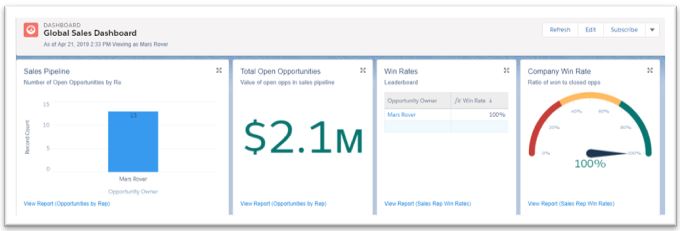
Being able to control the visibility of a component based upon the user details, custom permissions, a field value of a record (or related record) brings another dimension to Lightning. It gives you control over what your users see (or don’t see). Maybe certain information is only valuable to a specific set of users, or relevant to a record that meets certain criteria (like Opportunity stage or Close Date). There are dozens of reasons why you may want to save some real estate on your record page and not show a component. You can show one component to one set of users and a different component to a separate set of users. For example, maybe you want to display a dashboard on the Home Page for all your Sales reps that show how much they have sold, what is coming in their pipeline, and what is at risk. That is helpful for an individual Sales person, but what about the Sales Managers? They want to see all the information for the entire team. With Dynamic Lightning Pages you can display one Dashboard for individual sellers and a separate dashboard for the Sales Managers. Controlling the component visibility is done with Clicks – not code and there are so many options and / or use cases where this Lightning feature can be game changer.

Navigation in Lightning is next on my list.

Being able to easily and quickly customize your Navigation bar is a definite productivity win. I love how you can drag and drop to rearrange the tabs on your Nav Bar, you can quickly add a tab for just about anything…. a List View, a Report, a Dashboard, a specific Record (maybe one of your VERY Important Accounts could be saved as a tab on your Nav Bar). The drop-down options available on each tab provides a variety of selections for viewing Recent records, Recent list views, your Favorites all related to that specific tab. It doesn’t get much easier than that to find a record you had just recently been viewing. Walla – it’s right there on that drop-down menu.

Favorites are still one of my favorites 😊

Being able to quickly add a Favorite (with a single click) and go back to that Report, List View, Record, etc… Again, just by clicking on one of your favorites. Favorites are very easy to rearrange, remove, or add new. Definitely a time saver!

Dashboards

I’d be remiss if I didn’t include Dashboards on my list of Favorites. The ability to flexibly design a dashboard with the width and height that makes the most sense for each component. You can stretch components out, make them narrow and tall, whatever works best for you. The end result is you can easily create some really nice, eye catching dashboards in Lightning.

The Utility Bar

Utility bar provides quick access to productivity tools, such as Notes; to allow you take notes from any page, maybe a Macro you have configured to quickly complete a set of repetitive steps, a Rich Text utility that provides information about that particular app, or the History of recent items you have accessed (in console apps). The utility bar is a fixed footer for your apps and you can have different utility bars for different apps with different utility items. It’s like a bonus set of Navigation tools.

Pinned List Views

Remember the days when every time you went to a specific tab, you would see a list of the Recently Viewed Records. Well, with Pinned List Views you can set the default list view you would like to have displayed when you go to a Tab. No more recently viewed items – just exactly what you want to see!

I could really go on and on about the cool Lightning Features that are available, but since the title of this post is “A Few of my Favorite Things” – I’ll wrap it up here. If you haven’t made the move to Lightning yet – don’t fear the change. Instead, embrace the opportunity to use some of these great features and experience gains in productivity. Who knows, maybe these will become some of your favorite things in Lightning as well.

Connect with Barb:

Trailblazer Community: Barb Dietz
LinkedIn: barbdietz
Twitter: @bdietz972

Posted in Salesforce Stuff | Tagged , , , , , , | Leave a comment

Salesforce Admin: Innovating the E.A.S.Y. Way

What do you do?
I’m a Salesforce Administrator.
<Blank Stare>

Raise your hand if you’ve gotten this response too. Even in the tech industry or business world, often times, people assume that means something different than it does.

Maybe they think you are an assistant to the Sales Manager, or some other role in ‘Sales’ related to ‘Administration’ – which (TBH) most people think of as paper pushing.

So, what is a Salesforce admin? A Salesforce Administrator is a business leader, deeply knowledgeable about how their company operates, intertwined in making all departments successful through process automations, and thus, integral to running a smooth & lean business.

https://www.salesforce.com/blog/2016/05/what-is-a-salesforce-admin.html

Definitely not just a paper pusher, and not just specific to ‘Sales’. And look at those descriptors:

  • business leader
  • deeply knowledgeable
  • intertwined
  • integral

When I was asked to take over setting up a Salesforce CRM 12 years ago, I didn’t know what it meant to be a Salesforce Administrator. I knew it looked like a pretty cool tool (I love new tech) and I knew it represented something I could really sink my teeth into and learn (learning new things is my favorite) and ultimately I had hoped it would help me become more useful and maybe even indispensable in my company.

So fast forward to now and I look at that description of a Salesforce Administrator and I can honestly say I definitely feel as if this is an accurate description.

But it’s not the title that makes me a ‘business leader’, or ‘deeply knowledgeable’, or ‘intertwined’ and ‘integral’ to the business. Those things came from me. From my drive to become those things. From my love of innovation.

This past Dreamforce I was asked to be a part of the Admin Keynote. If you are a long time reader of my blog you may remember this post in 2015 which showed my excitement when celebrating Admins became official at the largest tech conference in the world.

I sat in the crowd in 2014 for the first EVER Admin Keynote and would never have imagined that day that five years later I would actually be featured and get to talk to THE Parker Harris to a room of over 6000 people and simulcast live across the globe.

Parker’s question to me: What’s your advice to everyone on how to deliver innovation?

My answer: I’ve got an E.A.S.Y. formula for you to remember! (because awesome admins love to write formulas, right SteveMo?)

So this is Innovating the E.A.S.Y. way:

Embrace Change

Always Be Learning

Show Your Work

You Got This

Over the next four blog posts, I’ll take a deeper dive into each of these and show you how you can ramp up your innovation game and become the awesome Salesforce Admin described above using this formula!

What are some other adjectives you would use to describe the role of Salesforce Administrator? How do you describe it when asked ‘What do you do?’

Posted in Salesforce Stuff | Tagged , , , , , , , , , , | Leave a comment

Invisible Innovation

If a tree falls in the forest and no one is around to hear it, does it even make a sound?

If you are a reader of my blog you could probably be described as an innovator. As someone who introduces new methods, processes, and ideas. As someone who looks for ways to streamline, create efficiencies and generally make the world (and Salesforce org) around you a better place.

And 90% of you do it because that’s just what you do. It’s who you are. You are a noticer – you notice when something isn’t as smooth or seamless as it could be and you do what you can to fix it. Or when a group of users has a repetitive process and by implementing a few cool automation tools (I love you Lightning Flow) you can cut the time it takes them from 15 minutes down to about 4 minutes.

So you build something super-cool and let it out into the world. You write-up an email about why and how it works, you even record a quick video about it, then send it to those who will benefit the most.

Then you wait for feedback.

And someone might reply with ‘Cool bro, thanks’, but most are piled under with other emails and urgent matters and don’t get around to responding. You wonder if they even read the email.

You wonder if they have even tried out this new super cool automation.

And sure, some of your wonder is personal. You worked hard on this, and it’s nice to see that something is being used. But some is also about understanding whether you are like that tree falling in the forest. Can you make a sound if no one is listening? Are the users in your organization resistant to change, are they welcoming to new ways of doing things?

That’s sometimes a hard one to contemplate. And hard to measure. We’ve recently put together some great Lightning Screen Flows to save time for a group of users who have a heavy workload. But while we rolled it out, we had a hard time determining whether anyone was using it, much less get feedback on why they are/aren’t using it or what might make it better.

So we decided to create a very simple Automations Analytics process so we can see when one of our screen flows is being used. This way we can see who is (and who isn’t) using an automation and we can work to investigate why or why not and make changes or improvements as needed.

Here’s what we did:

  • Create a Custom Object called Automation Analytics
    • Add 2 fields: Automation Name (text field), Run Date/Time (date/time field)
    • Enable Reports
    • Give Create permissions for all profiles
  • Add a Record Create element to create a new Automation Analytics record at the end of each screen flow
    • Put the name of the Flow in the Automation Name field, stamp the flow run date/time in the Run Date/Time field
    • No need for any other mapping – the person who runs the screen flow will be the Owner of the new automation analytics record

Botta-bing botta-boom! Now you can report easily on when your screen flows are being used and by whom. You are, in essence, listening for trees falling in the forest!

Now, I’ll be honest, in our case the results haven’t been blazing. It confirmed my suspicions that the flows aren’t being used as we had hoped. But at least I know now. We can find out why and tweak the flows to be more useful. Or we can realize that this particular team is resistant to change and either try figure out their ‘WIIFM’ or make the decision to stop spending time trying to help those that don’t want the help and focus on other groups and/or processes.

Either way I can now point to real results when someone asks me to validate some of the things we are doing.

Take a look at some of your automations and see where you might want to build in some analytics. This could even be done with Process Builder as well. But only do it if you intend to act on the results. Analytics for the sake of analytics with no real plan to review and revise is just extra data no one needs!

Read my previous post on Innovation here!

Posted in Salesforce Stuff | Tagged , , , , , , , | 3 Comments